Once the installation procedure has been successful you will notice a Belina icon on your desktop.
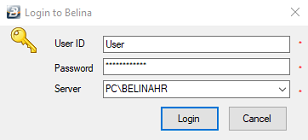
Double-click on the icon to have the login screen appear. Enter the Belina default login details:
User ID: |
User |
Password: |
password |
Server: |
Name_of_your_computer\BELINAHR (it comes out automatically) |
NOTE: these login details should be changed as soon as possible for security of the information.
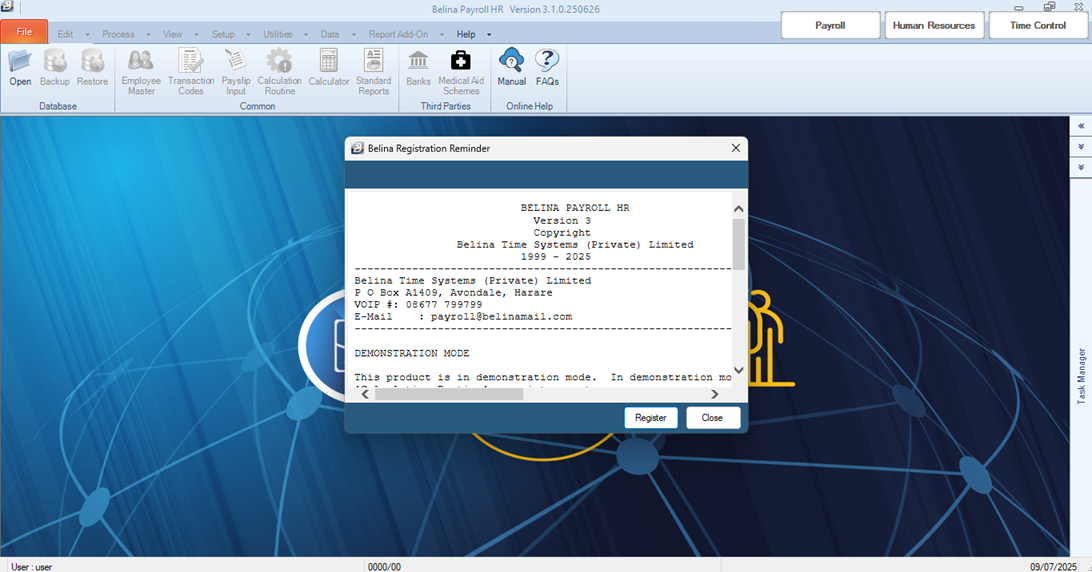
By default, Belina PayrollHR goes into demonstration mode. The following screen appears which allows the entry of your registration details. Full access is allowed once these have been entered. Call Belina Time Systems (Private) Limited for the details, then click 'Register'.
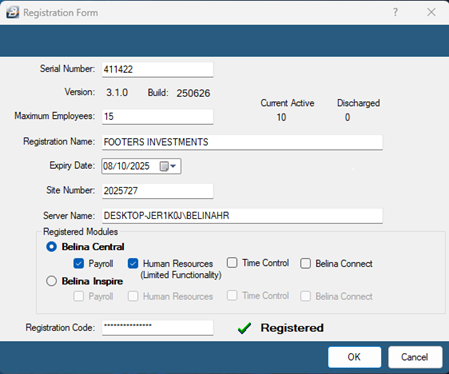
Type in the registration details into the form . Once these have been entered press 'Tab' on your computer keyboard which should then show whether the system is 'Registered'. If the details are not complete the system will remain 'Unregistered'. When you have successfully entered the registration details a green tick appears on the registration Window: