Scheme Overview
The Accident Prevention and Workers’ Compensation Scheme (APWCS) is a mandatory employer-funded social security pillar administered by NSSA. It provides financial and medical relief to employees affected by work-related injuries or diseases.
•Responsibility: 100% Employer-funded. No deductions should be made from the employee.
•Coverage: All employees, regardless of tenure.
Statutory Calculation Rules
Per Statutory Instrument 22 of 2024, the calculation of premiums is governed by a conditional logic based on the composition of the employee's earnings.
Rule |
Condition |
Calculation Base |
Threshold Rule |
If Allowances + Benefits exceed Basic Salary |
Total Gross Earnings (Basic + All Benefits) |
Basic Salary Rule |
If Allowances + Benefits are less than or equal to Basic Salary |
Basic Salary Only |
No Ceiling |
Applies to all scenarios |
No maximum limit on insurable earnings |
System Setup Instructions
To configure or update the APWCS Transaction Code, follow these steps:
1.Go to Edit > Transaction Codes.
2.Search the list for an existing APWCS code and click Change.
-If it does not exist, click Insert and select the Category ‘Other – Employer Contributions’.
-Assign a unique identifier code.
-Enter a clear description, e.g., APWCS.
3.Parameters:
oContribution Type: Select APWCS from the dropdown menu.
oPercentage: Enter the specific rate assigned to your industry by NSSA. (If unknown, contact NSSA to verify your risk category percentage).
oInsert Automatically: Tick this box to ensure the contribution is added to all new employee payslips.
oInclude Allowances and Benefits: Tick this box to enable the software to automatically apply the "Threshold Rule" (comparing allowances against basic salary).
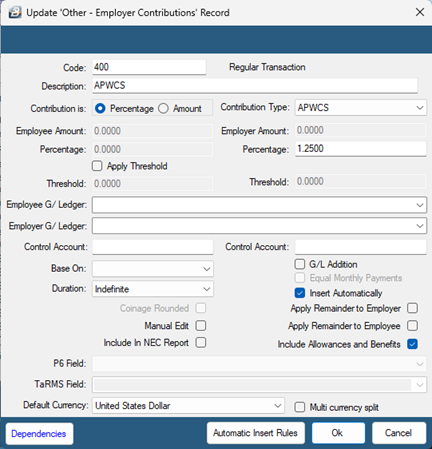
4.Click OK to save changes.