To process a loan adjustment:

Click to play
Transaction Code Setup
To do a loan adjustment make sure that there is a Loan Adjustment Transaction Code setup. To do this:
•Go to the 'Edit', 'Transaction Codes' menu options
•Browse through the listed Transaction Codes to see whether there is a Loan Adjustment Code, if not then
•Press 'Insert', select the 'Loan Adjustment' Transaction Category
•A form displays the Loan Adjustment fields, complete these
•Press 'OK'
Process Loan Adjustment
Then identify the person who is having a loan adjusted and take a note of the Transaction Code associated with the particular loan being adjusted. To do this:
•Go to the 'Process', then 'Payslip Input' menu options
•Select the employee from the table
•View the transactions on that person's Payslip Input,
•Select the Loan Transaction Code being adjusted
•Set the 'Current Repayment' to Zero if no repayment is to be made in the current period. This could happen, for example, if the loan has been settled/ cleared outside the payroll and we want to clear the whole loan balance.
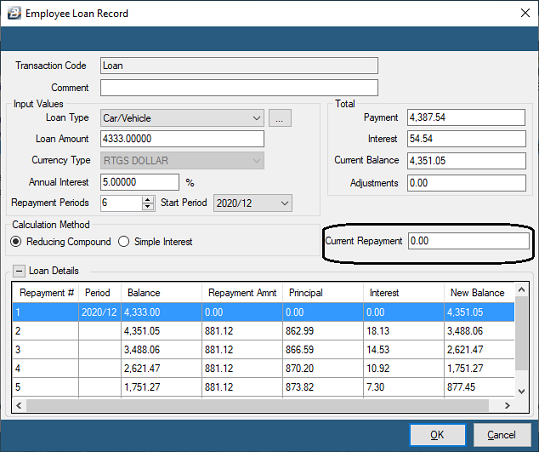
•Press 'OK' to save the change
•Then press 'Insert' select the 'Loan Adjustment' Transaction Code
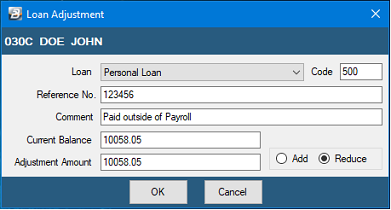
•Use the dropdown menu against 'Loan' to select the particular loan being adjusted.

|